![[高级]龙虾开壳到配置详解 OpenClaw完全指南](/upload/16-9-FbXg.png)

搭配视频教程观看体验更佳!
为什么出这期?因为很多朋友之前配机器人的时候总出现. 创建 HR Agent 后,群聊里还是主 Agent 在回复.多个群聊绑定后,Agent "串台"(身份混乱)问题.问"你是谁"时,Agent 仍然回答自己是主 Agent
或者就是Agent说绑定成功了,但是却没绑定上。这次直接带大家开盒openclaw,看看蟹壳下面是什么构造,看看它的工作目录是怎样的,配置文件应该怎么配。靠人不如靠自己,了解原理,才能更稳妥的折腾。
版本自查
折腾之前先自查一下版本,我做这个教程的时候使用的版本是openclaw的v2026.3.23-2。
如果你有使用飞书作为消息渠道,那么飞书插件是飞书官方提供的openclaw-lark插件,安装方式可以使用命令安装:
npx -y @larksuite/openclaw-lark-tools install确保你的飞书插件是上面的插件,因为openclaw自带的飞书插件支持的功能不如飞书官方的多,比如流式输出,多维表格等。
官方文档
推荐大家可以多看看官方文档,了解最新资讯 https://docs.openclaw.ai/
找到配置目录位置
在mac或者Linux上,一般是在这个目~/.openclaw,如果没有就直接问你的主Agent要路径"帮我列出openclaw的工作目录"。
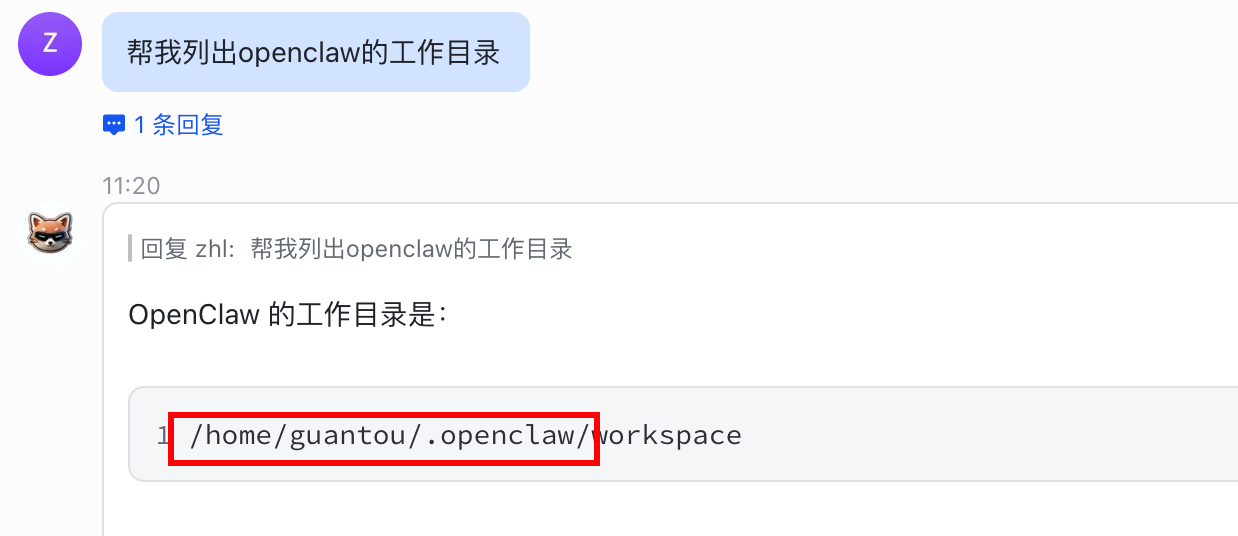
红框标注的就是openclaw的工作目录了。
使用vscode来访问
直接下载一下vscode https://code.visualstudio.com/ ,这是个超级受欢迎的代码编辑器,可以更好的帮助你查看代码文件。
本地安装
如果你是本机安装的openclaw,就直接使用vscode,打开 .openclaw 目录就行,注意,这个目录是一个隐藏目录,需要你提前把显示隐藏目录打开才能找到。
远程安装
如果你和我一样是在别的机器上安装的,比如我就是在局域网内的虚拟机上安装的,需要使用vscode的远程连接功能去连接那台服务器上的.openclaw目录。
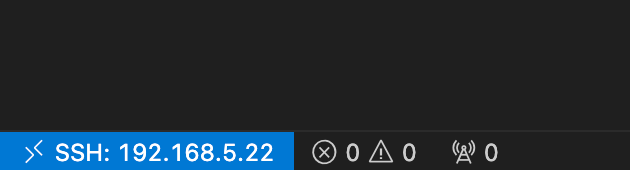
具体做法是打开vscode后,点左下角的这个图标,启动远程连
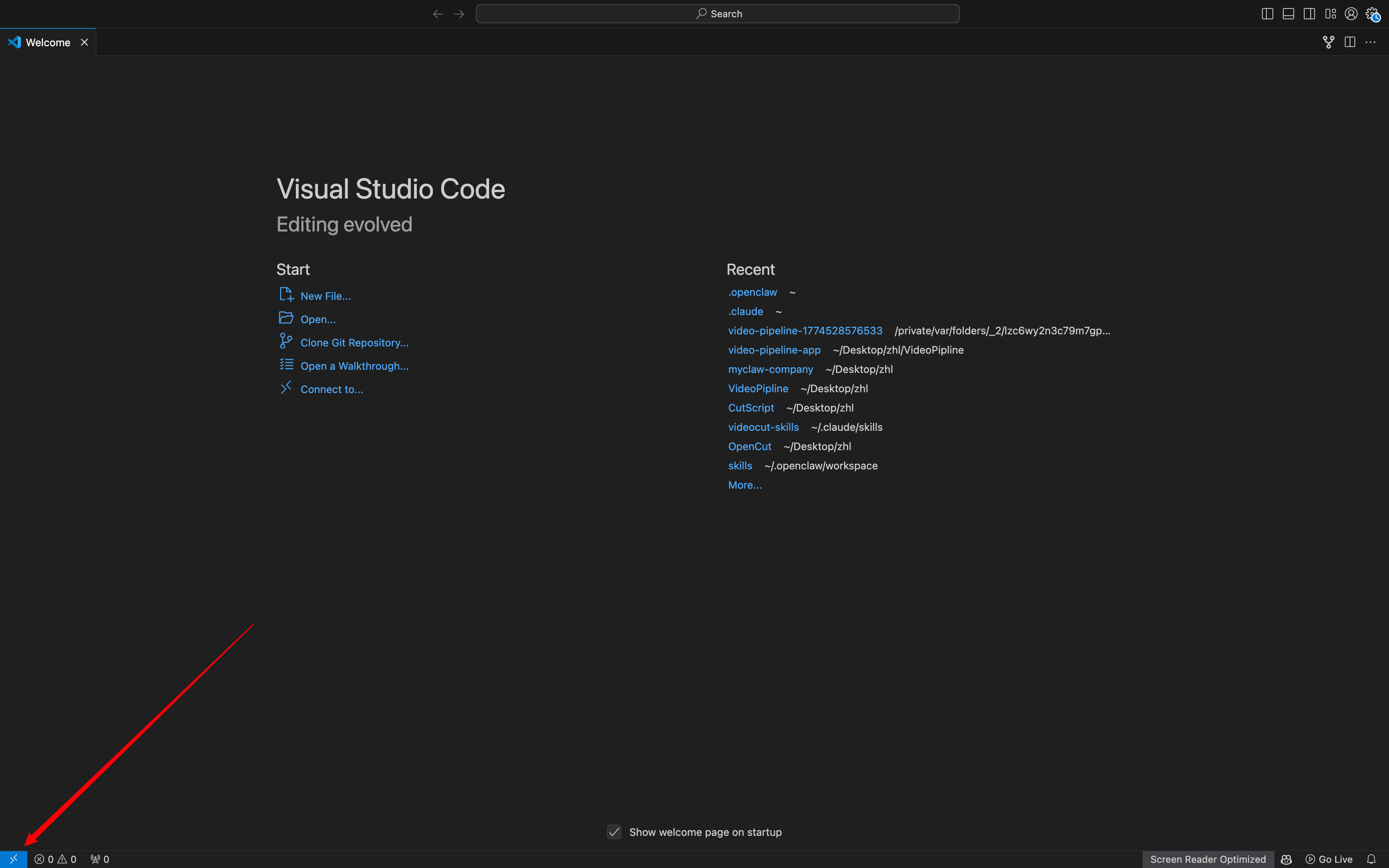
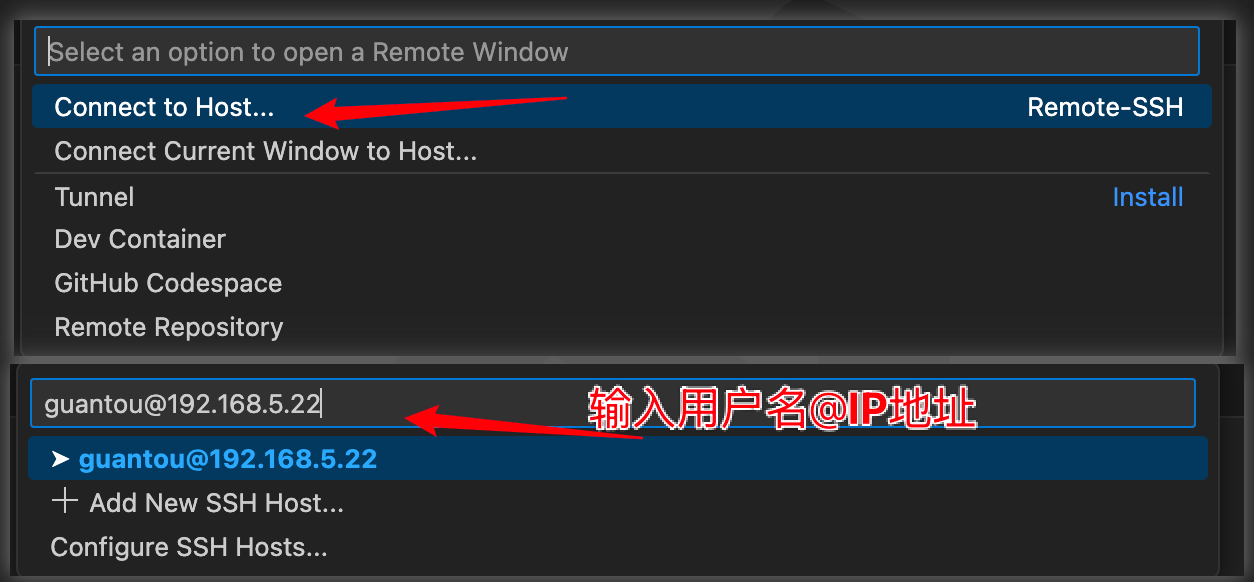
然后输入路径,注意,它默认就会打开你的家目录,你只需要在后面接上.opencla
.
├── agents
├── backups
├── browser
├── canvas
├── completions
├── credentials
├── cron
├── delivery-queue
├── devices
├── exec-approvals.json
├── extensions
├── feishu
├── identity
├── logs
├── media
├── memory
├── openclaw.json
├── openclaw.json.backup.20260314-195433
├── openclaw.json.backup.20260315151852
├── openclaw.json.backup.20260315163449
├── openclaw.json.bak
├── openclaw.json.bak.1
├── openclaw.json.bak.2
├── openclaw.json.bak.3
├── openclaw.json.bak.4
├── openclaw-weixin
├── projects
├── skills
├── subagents
├── update-check.json
├── workspace
├── workspace-claude
├── workspace-claude-code
├── workspace-copywriter
├── workspace-gold
├── workspace-healer
├── workspace-knowledge-curator
├── workspace-opencode
├── workspace-ops-monitor
├── workspace-pr-manager
├── workspace-product-manager
├── workspace-recruiter
├── workspace-skill-observer
├── workspace-stock-guru
├── workspace-weather
├── workspace-xiaotie-manager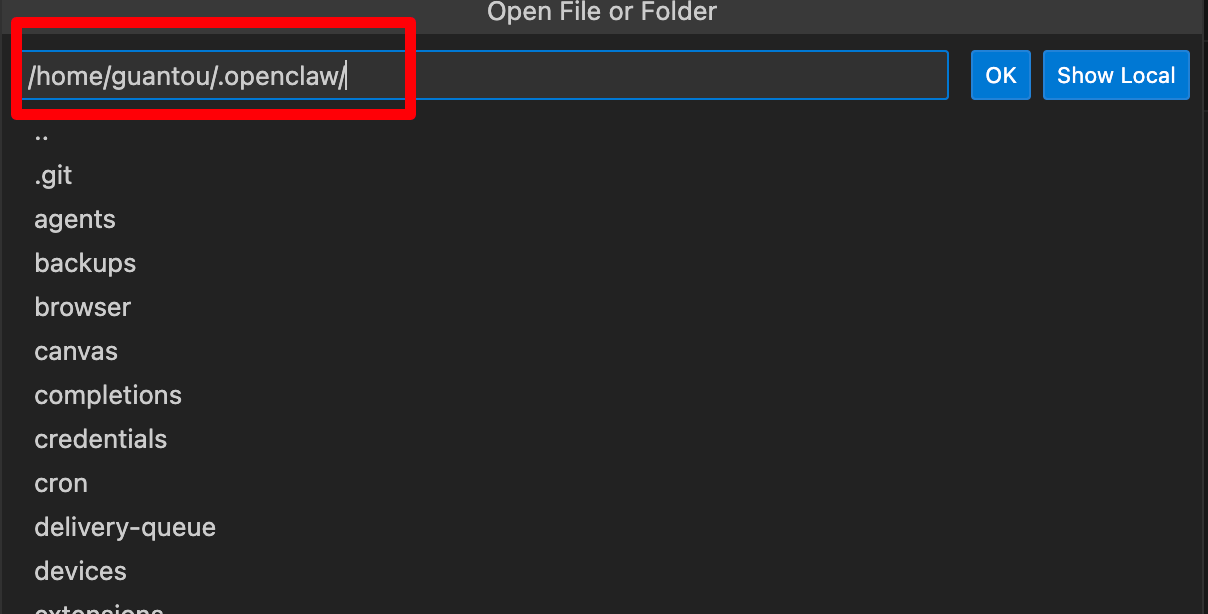
核心配置与基础目录
openclaw.json / .bak / .backup...:
含义:系统的核心配置文件,包含 API 密钥、模型设置、渠道(如飞书、微信)配置等。
能力:定义了智能体能用什么模型、连接哪个平台。
用法:建议通过控制台修改。你看到的
.bak和.2026...是系统自动生成的版本备份,配置出错时可将其重命名回openclaw.json进行恢复。
credentials: 存储敏感的身份凭证,如 OAuth 令牌、API Keys 等。通常由系统管理,无需手动操作。
logs: 存放系统运行日志。当智能体报错或任务失败时,在此查看具体原因。
智能体与能力扩展
agents / subagents:
含义:存储主智能体及子智能体的定义和状态。
能力:OpenClaw 支持父智能体生成子智能体来处理特定任务(如代码编写或信息搜集)。
用法:系统在运行时自动维护,反映了当前活跃的 AI 实例。
skills:
含义:全局技能库,通常为 Markdown 格式的指令集。直接在目录最高层级写,说明所有的子Agent都可以使用这些skill
能力:赋予 AI “专业知识”或固定操作流程SOP(如“如何整理早报”),它是按需加载的增强插件。
用法:你可以将自定义的
.md技能文件放入此目录,并在对话中通过技能名称调用。
extensions: 存放安装的第三方扩展插件,如特定平台的适配器或新工具。
任务执行与自动化
cron: 存储定时任务配置。允许 Agent 在特定时间(如每天早 7 点)自动执行任务。
browser: 存放浏览器自动化的持久化数据(如 Cookie、Session)。它支持通过 Playwright 操作网页。
delivery-queue: 发送队列,用于管理发送到飞书、微信等渠道的消息,确保在高频或网络波动时消息不丢失。
exec-approvals.json: 存储命令执行授权。当 AI 尝试运行高风险命令时,如果你在控制台点击了“总是允许”,记录会存放在这里。
记忆与数据存储
memory: 长短期记忆系统,通常存放 AI 记录的知识片段或历史事实。
canvas: 用于存放 AI 生成的“画布”内容(类似于 Claude Artifacts),如代码预览、文档草稿等。
media: 存放 AI 处理或生成的多媒体文件(图片、音频、截图)。
工作空间 (Workspace)
每一个子Agent都有一个属于自己的工作目录,和其他Agent相互隔离。
workspace: 默认的本地操作区。AI 读写文件、运行代码都在此沙盒中进行。
workspace-xxx (如 workspace-claude, workspace-stock-guru 等):
含义:这是 OpenClaw 的多任务/项目隔离机制。
能力:针对不同的角色(如招聘专员
recruiter、股票专家stock-guru)分配独立的文件环境。用法:当你在对话中切换到某个特定 Agent 时,它只能看到并操作对应的
workspace-xxx文件夹,确保数据不互相干扰。
通讯渠道
feishu / openclaw-weixin: 存放对应即时通讯平台的适配数据和会话状态。
identity: 存储智能体在这些平台上的身份标识信息。
建议: 如果你需要调整 AI 的行为,优先修改 skills 里的 Markdown 文件;如果系统运行异常,先检查 logs。
你想深入了解其中哪个工作空间(Workspace)或技能(Skills)的具体配置吗?
openclaw.json详解
{
// 元信息
"meta": {
"lastTouchedVersion": "2026.3.23-2",
"lastTouchedAt": "2026-03-26T03:50:01.895Z"
},
// 环境变量信息
"env": {
"shellEnv": {
"enabled": true
},
"vars": {
"TAVILY_API_KEY": "xxxxxx",
"SEARXNG_URL": "http://192.168.5.19:4000",
"xx":"xx"
}
},
// 运行向导记录
"wizard": {
"lastRunAt": "2026-03-25T09:48:03.489Z",
"lastRunVersion": "2026.3.2",
"lastRunCommand": "doctor",
"lastRunMode": "local"
},
"browser": {
"attachOnly": false
},
// 认证信息
"auth": {
// 各个模型的配置信息
"profiles": {
"minimax:default": {
"provider": "minimax",
"mode": "api_key"
},
"minimax-cn:default": {
"provider": "minimax-cn",
"mode": "api_key"
},
"kimi-coding:default": {
"provider": "kimi-coding",
"mode": "api_key"
}
}
},
// ACP协议配置 可以控制连接不在openclaw范围内的Agent
"acp": {
"enabled": true,
"dispatch": {
"enabled": true
},
"backend": "acpx",
"defaultAgent": "claude",
"allowedAgents": [
"pi",
"claude",
"codex",
"opencode",
"gemini"
],
"maxConcurrentSessions": 8
},
// 模型配置信息
"models": {
"mode": "merge",
"providers": {
"minimax-cn": {
"baseUrl": "https://api.minimaxi.com/anthropic",
"apiKey": "xxxxx",
"api": "anthropic-messages",
"models": [
{
"id": "MiniMax-M2.5-highspeed",
"name": "MiniMax-M2.5-highspeed",
"api": "anthropic-messages",
"reasoning": true,
"input": [
"text",
"image"
],
"cost": {
"input": 0.3,
"output": 1.2,
"cacheRead": 0.03,
"cacheWrite": 0.12
},
"contextWindow": 200000,
"maxTokens": 8192
},
{
"id": "MiniMax-M2.7",
"name": "MiniMax-M2.7",
"api": "anthropic-messages",
"reasoning": true,
"input": [
"text",
"image"
],
"cost": {
"input": 0.3,
"output": 1.2,
"cacheRead": 0.03,
"cacheWrite": 0.12
},
"contextWindow": 200000,
"maxTokens": 8192
}
]
},
"kimi-coding": {
"baseUrl": "https://api.kimi.com/coding/",
"api": "anthropic-messages",
"models": [
{
"id": "k2p5",
"name": "Kimi for Coding",
"reasoning": true,
"input": [
"text",
"image"
],
"cost": {
"input": 0,
"output": 0,
"cacheRead": 0,
"cacheWrite": 0
},
"contextWindow": 262144,
"maxTokens": 32768
}
]
}
}
},
// Agent定义
"agents": {
// 全局默认配置模版 可以被继承
"defaults": {
"model": {
// 优先使用哪个模型
"primary": "kimi-coding/k2p5"
},
// 可用模型
"models": {
"minimax/MiniMax-M2.5": {
"alias": "Minimax"
},
"minimax-cn/MiniMax-M2.5": {
"alias": "Minimax"
},
"kimi-coding/k2p5": {
"alias": "Kimi for Coding"
}
},
// 工作目录
"workspace": "/home/guantou/.openclaw/workspace",
// 大模型的上下文窗口(Token)是有限的,聊得太长会爆满。`safeguard`(安全卫士)模式意味着当对话快达到 Token 上限时,OpenClaw 会自动对前面的聊天记录进行摘要、折叠或清理,保证新消息能正常发出去而不报错。
"compaction": {
"mode": "safeguard"
},
// 心跳时间间隔
"heartbeat": {
"every": "10m"
},
// 使用这个Agent最多并发多少会话
"maxConcurrent": 4,
// 调用子Agent的并发数量
"subagents": {
"maxConcurrent": 8
}
},
// 子Agent列表
"list": [
{
"id": "main",
"tools": {
"profile": "full", // 权限级别为全部
"alsoAllow": [
"feishu_bitable_app",
"feishu_bitable_app_table",
"feishu_bitable_app_table_field",
"feishu_bitable_app_table_record",
"feishu_bitable_app_table_view",
"feishu_calendar_calendar",
"feishu_calendar_event",
"feishu_calendar_event_attendee",
"feishu_calendar_freebusy",
"feishu_chat",
"feishu_chat_members",
"feishu_create_doc",
"feishu_doc_comments",
"feishu_doc_media",
"feishu_drive_file",
"feishu_fetch_doc",
"feishu_get_user",
"feishu_im_bot_image",
"feishu_im_user_fetch_resource",
"feishu_im_user_get_messages",
"feishu_im_user_get_thread_messages",
"feishu_im_user_message",
"feishu_im_user_search_messages",
"feishu_oauth",
"feishu_oauth_batch_auth",
"feishu_search_doc_wiki",
"feishu_search_user",
"feishu_sheet",
"feishu_task_comment",
"feishu_task_subtask",
"feishu_task_task",
"feishu_task_tasklist",
"feishu_update_doc",
"feishu_wiki_space",
"feishu_wiki_space_node"
],
"deny": [
"web_search",
"web_fetch"
]
}
},
{
"id": "video-cut",
"name": "video-cut",
"workspace": "/home/guantou/.openclaw/workspace-video-cut",
"agentDir": "/home/guantou/.openclaw/agents/video-cut/agent",
"tools": {
"alsoAllow": [
"group:runtime",
"feishu_bitable_app",
"feishu_bitable_app_table",
"feishu_bitable_app_table_field",
"feishu_bitable_app_table_record",
"feishu_bitable_app_table_view",
"feishu_calendar_calendar",
"feishu_calendar_event",
"feishu_calendar_event_attendee",
"feishu_calendar_freebusy",
"feishu_chat",
"feishu_chat_members",
"feishu_create_doc",
"feishu_doc_comments",
"feishu_doc_media",
"feishu_drive_file",
"feishu_fetch_doc",
"feishu_get_user",
"feishu_im_bot_image",
"feishu_im_user_fetch_resource",
"feishu_im_user_get_messages",
"feishu_im_user_get_thread_messages",
"feishu_im_user_message",
"feishu_im_user_search_messages",
"feishu_oauth",
"feishu_oauth_batch_auth",
"feishu_search_doc_wiki",
"feishu_search_user",
"feishu_sheet",
"feishu_task_comment",
"feishu_task_subtask",
"feishu_task_task",
"feishu_task_tasklist",
"feishu_update_doc",
"feishu_wiki_space",
"feishu_wiki_space_node"
],
"deny": [
"group:web",
"group:fs"
]
}
},
{
"id": "claude-code",
"name": "claude-code",
"workspace": "/home/guantou/.openclaw/workspace-claude-code",
"agentDir": "/home/guantou/.openclaw/agents/claude-code/agent",
"model": "kimi-coding/k2p5",
"tools": {
"alsoAllow": [*]
},
// ACP类型的Agent
"runtime": {
"type": "acp",
"acp": {
"agent": "claude",
"backend": "acpx",
"mode": "persistent"
}
}
},
{
"id": "recruiter",
"name": "recruiter",
"workspace": "/home/guantou/.openclaw/workspace-recruiter",
"agentDir": "/home/guantou/.openclaw/agents/recruiter/agent",
"tools": {
"alsoAllow": [
"feishu_bitable_app",
"feishu_bitable_app_table",
"feishu_bitable_app_table_field",
"feishu_bitable_app_table_record",
"feishu_bitable_app_table_view",
"feishu_calendar_calendar",
"feishu_calendar_event",
"feishu_calendar_event_attendee",
"feishu_calendar_freebusy",
"feishu_chat",
"feishu_chat_members",
"feishu_create_doc",
"feishu_doc_comments",
"feishu_doc_media",
"feishu_drive_file",
"feishu_fetch_doc",
"feishu_get_user",
"feishu_im_bot_image",
"feishu_im_user_fetch_resource",
"feishu_im_user_get_messages",
"feishu_im_user_get_thread_messages",
"feishu_im_user_message",
"feishu_im_user_search_messages",
"feishu_oauth",
"feishu_oauth_batch_auth",
"feishu_search_doc_wiki",
"feishu_search_user",
"feishu_sheet",
"feishu_task_comment",
"feishu_task_subtask",
"feishu_task_task",
"feishu_task_tasklist",
"feishu_update_doc",
"feishu_wiki_space",
"feishu_wiki_space_node"
]
}
},
{
"id": "copywriter",
"name": "copywriter",
"workspace": "/home/guantou/.openclaw/workspace-copywriter",
"agentDir": "/home/guantou/.openclaw/agents/copywriter/agent",
"tools": {
"alsoAllow": [
"feishu_bitable_app",
"feishu_bitable_app_table",
"feishu_bitable_app_table_field",
"feishu_bitable_app_table_record",
"feishu_bitable_app_table_view",
"feishu_calendar_calendar",
"feishu_calendar_event",
"feishu_calendar_event_attendee",
"feishu_calendar_freebusy",
"feishu_chat",
"feishu_chat_members",
"feishu_create_doc",
"feishu_doc_comments",
"feishu_doc_media",
"feishu_drive_file",
"feishu_fetch_doc",
"feishu_get_user",
"feishu_im_bot_image",
"feishu_im_user_fetch_resource",
"feishu_im_user_get_messages",
"feishu_im_user_get_thread_messages",
"feishu_im_user_message",
"feishu_im_user_search_messages",
"feishu_oauth",
"feishu_oauth_batch_auth",
"feishu_search_doc_wiki",
"feishu_search_user",
"feishu_sheet",
"feishu_task_comment",
"feishu_task_subtask",
"feishu_task_task",
"feishu_task_tasklist",
"feishu_update_doc",
"feishu_wiki_space",
"feishu_wiki_space_node"
]
}
},
{
"id": "product-manager",
"name": "product-manager",
"workspace": "/home/guantou/.openclaw/workspace-product-manager",
"agentDir": "/home/guantou/.openclaw/agents/product-manager/agent",
"tools": {
"alsoAllow": [
"feishu_bitable_app",
"feishu_bitable_app_table",
"feishu_bitable_app_table_field",
"feishu_bitable_app_table_record",
"feishu_bitable_app_table_view",
"feishu_calendar_calendar",
"feishu_calendar_event",
"feishu_calendar_event_attendee",
"feishu_calendar_freebusy",
"feishu_chat",
"feishu_chat_members",
"feishu_create_doc",
"feishu_doc_comments",
"feishu_doc_media",
"feishu_drive_file",
"feishu_fetch_doc",
"feishu_get_user",
"feishu_im_bot_image",
"feishu_im_user_fetch_resource",
"feishu_im_user_get_messages",
"feishu_im_user_get_thread_messages",
"feishu_im_user_message",
"feishu_im_user_search_messages",
"feishu_oauth",
"feishu_oauth_batch_auth",
"feishu_search_doc_wiki",
"feishu_search_user",
"feishu_sheet",
"feishu_task_comment",
"feishu_task_subtask",
"feishu_task_task",
"feishu_task_tasklist",
"feishu_update_doc",
"feishu_wiki_space",
"feishu_wiki_space_node"
]
}
},
// 还有很多子Agent 配置都差不多 先不列了
]
},
// 默认工具使用权限 这里设置的都是full
"tools": {
"profile": "full"
},
// ⭐️ 会话绑定!!
"bindings": [
// 飞书机器人绑定 AgentId对应上面的子AgentId
// channel选择飞书
// accountId对应下面的飞书机器人的accountId
{
"agentId": "copywriter",
"match": {
"channel": "feishu",
"accountId": "postwriter"
}
},
{
"agentId": "ops-monitor",
"match": {
"channel": "feishu",
"accountId": "devops"
}
},
// 飞书群聊绑定 AgentId对应上面的子AgentId
// peer.kind 为group 标识群聊渠道
// peer.id 标识你需要把Agent绑定到哪个群聊
{
"agentId": "recruiter",
"match": {
"channel": "feishu",
"peer": {
"kind": "group",
"id": "oc_d327c72f3bbd38ba6707afce5a73109b"
}
}
},
{
"agentId": "copywriter",
"match": {
"channel": "feishu",
"peer": {
"kind": "group",
"id": "oc_1e1977a0053a86eba1d7211f387f5be2"
}
}
},
{
"agentId": "product-manager",
"match": {
"channel": "feishu",
"peer": {
"kind": "group",
"id": "oc_866a40a31dd7005cecbb13e478cfe20d"
}
}
},
// 后面还有很多 不列了。。。
],
// 意思是你发了消息之后 是否使用一个小表情告诉你他正在处理 这里是默认值 群聊中艾特或者私聊的时候 你的消息上都会出现回复表情
"messages": {
"ackReactionScope": "group-mentions"
},
"commands": {
"native": "auto",
"nativeSkills": "auto",
"restart": true,
"ownerDisplay": "raw"
},
// 会话隔离机制
"session": {
// 为每一个 [机器人账号] + [接入渠道] + [对方用户] 生成一个独立的会话上下文
"dmScope": "per-account-channel-peer"
},
"hooks": {
"internal": {
"enabled": true,
"entries": {
"session-memory": {
"enabled": true
},
"command-logger": {
"enabled": true
},
"bootstrap-extra-files": {
"enabled": true
},
"boot-md": {
"enabled": true
}
}
}
},
"channels": {
"feishu": {
"enabled": true,
"appId": "cli_a915a37896b8dbd7",
"appSecret": "xxxxx",
"domain": "feishu",
"requireMention": false,
"footer": {
"elapsed": true,
"status": true
},
"streaming": true,
"threadSession": true,
"groups": {
"*": {
"requireMention": false,
"groupPolicy": "open"
}
},
"accounts": {
// 多账户绑定 下面的每个键都对应上面binding里的Agent才行
"whetherbot": {
"appId": "cli_a93ff5a011381bcd",
"appSecret": "xxxxx",
"botName": "真天气助手",
"dmPolicy": "open",
"allowFrom": [
"*"
],
"enabled": true
},
"devops": {
"appId": "cli_a93ce0d904b8dbde",
"appSecret": "xxxxx",
"botName": "运维助手",
"dmPolicy": "open",
"allowFrom": [
"*"
],
"enabled": true
},
"postwriter": {
"appId": "cli_a93cd11ed679dbd9",
"appSecret": "xxxxx",
"botName": "真文案助手",
"dmPolicy": "open",
"allowFrom": [
"*"
],
"enabled": true
},
"default": {
"groupPolicy": "open",
"dmPolicy": "open",
"allowFrom": [
"*"
]
}
},
"groupPolicy": "open", // 群聊权限 任何机器人被拉入任何群都可以对话
"replyMode": {
"group": "streaming",
"direct": "streaming"
}
}
},
// 网关配置
"gateway": {
"port": 18789,
"mode": "local",
"bind": "lan", // 是否可以外部访问
"controlUi": {
"enabled": true,
// 外部访问必须要开的设置
"allowedOrigins": [
"*"
],
"dangerouslyAllowHostHeaderOriginFallback": true,
"allowInsecureAuth": true,
"dangerouslyDisableDeviceAuth": true
},
// 访问秘钥
"auth": {
"mode": "token",
"token": "xxxxxx"
},
"tailscale": {
"mode": "off",
"resetOnExit": false
},
"reload": {
"mode": "hot"
}
},
"skills": {
"install": {
"nodeManager": "npm"
},
// skill中如果有需要配置参数的 可以在这里配置
"entries": {
"minimax-search": {
"enabled": true,
"apiKey": "xxx"
},
"searxng": {
"enabled": true,
"env": {
"SEARXNG_URL": "http://192.168.5.19:4000"
}
}
}
},
"plugins": {
"allow": [
"acpx",
"openclaw-lark"
],
"load": {
"paths": [
"/home/guantou/.nvm/versions/node/v24.14.0/lib/node_modules/openclaw/dist/extensions/acpx"
]
},
"entries": {
"acpx": {
"enabled": true,
"config": {
"permissionMode": "approve-all",
"nonInteractivePermissions": "deny"
}
},
"openclaw-lark": {
"enabled": true
}
},
// 安装的插件都在这里
"installs": {
"acpx": {
"source": "path",
"spec": "acpx",
"sourcePath": "/home/guantou/.nvm/versions/node/v24.14.0/lib/node_modules/openclaw/dist/extensions/acpx",
"installPath": "/home/guantou/.nvm/versions/node/v24.14.0/lib/node_modules/openclaw/dist/extensions/acpx",
"installedAt": "2026-03-25T14:04:10.887Z"
},
"openclaw-lark": {
"source": "archive",
"sourcePath": "/tmp/openclaw-lark-dU1Gxd/larksuite-openclaw-lark-2026.3.25.tgz",
"installPath": "/home/guantou/.openclaw/extensions/openclaw-lark",
"version": "2026.3.25",
"installedAt": "2026-03-25T13:59:56.040Z"
}
}
}
}绑定飞书机器人问题自查
三个地方需要查,agent.list,bindings中的agentId和match。
确认Agents中存在这个Agent,然后工作目录是独立的。
确认绑定配置bindings,AgentId要和一个渠道channel绑定,指定accountId就是绑定单个机器人
指定了peer就是绑定私聊或者群聊。
绑定多机器人的话,需要在account中存在机器人信息。
这三块配置需要仔细检查
最后最重要的!!!修改配置后记得重启网关!!!
"agents": {
  // 子Agent列表
  "list": [
    {
      "id": "recruiter",
      "name": "recruiter",
      "workspace": "/home/guantou/.openclaw/workspace-recruiter",
      "agentDir": "/home/guantou/.openclaw/agents/recruiter/agent"
    }
  ]
},
"bindings": [
  // 和机器人绑定
  {
    "agentId": "recruiter",
    "match": {
      "channel": "feishu",
      "accountId": "recruiter"
    }
  },
  // 和某个群聊绑定
  {
    "agentId": "recruiter",
    "match": {
      "channel": "feishu",
      "peer": {
        "kind": "group",
        "id": "oc_d327c72f3bbd38ba6707afce5a73109b"
      }
    }
  },
],
// 账号绑定
"channels": {
  "feishu": {
    "accounts": {
      "recruiter": {
        "appId": "cli_xxxxx",
        "appSecret": "xxxxx",
        "botName": "招聘HR",
        "dmPolicy": "open",
        "allowFrom": [
          "*"
        ],
        "enabled": true
      },
    }
  }
}
常用自查命令
重启网关使配置生效
openclaw gateway restart查看日志
openclaw logs --follow --grep "config\|error"检查网关状态
openclaw gateway status运行诊断
openclaw doctor --repair创建Agent
openclaw agents add
openclaw agents list # 查看Agent列表
Ctrl + `
OpenClaw 配置文件完整指南
基于官方文档: https://docs.openclaw.ai/
你的配置文件路径: ~/.openclaw/openclaw.json (JSON5 格式,支持注释和尾随逗号)
1meta - 元数据
作用: 记录配置文件的版本追溯信息,便于排查兼容性问题。
2env - 环境变量配置
env.shellEnv - Shell 环境继承
env.vars - 内联环境变量
{
  "env": {
    "vars": {
      "TAVILY_API_KEY": "xxxxxx",
      "SEARXNG_URL": "http://192.168.5.19:4000"
    }
  }
}作用: 集中管理环境变量,避免散落在系统中。内联变量仅在进程环境缺少该键时才应用。
环境变量优先级:
进程已有环境变量(最高优先级)
env.vars内联变量.env文件(CWD 和~/.openclaw/.env)shellEnv导入的 Shell 环境
3wizard - 设置向导状态
作用: 跟踪用户是否已完成初始化设置向导。
4browser - 浏览器配置
浏览器配置文件 browser.profiles)
5auth - 认证配置
auth.profiles - 认证配置文件
{
  "auth": {
    "profiles": {
      "provider:profileName": {
        "provider": "provider-name",
        "mode": "api_key"
      }
    }
  }
}作用: 统一管理不同 AI 提供商的认证方式。
6acp - Agent Communication Protocol(智能体通信协议)
ACP 流配置 acp.stream)
ACP 运行时配置 acp.runtime)
作用: ACPx 是 OpenClaw 的智能体运行时协议,支持多智能体协同和任务调度,可连接 Pi、Claude Code、Codex、Cursor、Copilot、OpenCode、Gemini CLI 等外部编码工具。
7models - AI 模型配置
models.mode - 提供商目录行为
models.providers - 自定义提供商
{
  "models": {
    "providers": {
      "provider-id": {
        "baseUrl": "https://api.example.com/v1",
        "apiKey": "your-api-key",
        "api": "anthropic-messages",
        "models": [
          {
            "id": "model-id",
            "name": "Display Name",
            "reasoning": true,
            "input": ["text", "image"],
            "cost": {
              "input": 0.3,
              "output": 1.2,
              "cacheRead": 0.03,
              "cacheWrite": 0.12
            },
            "contextWindow": 200000,
            "maxTokens": 8192
          }
        ]
      }
    }
  }
}
模型字段说明
API 适配器选项 api)
8agents - 智能体定义
agents.defaults - 默认配置
工作空间配置
启动配置
媒体配置
时区和时间格式
模型配置
{
  "agents": {
    "defaults": {
      "model": {
        "primary": "provider/model-id",
        "fallback": "provider/fallback-model"
      }
    }
  }
}
CLI 后端配置 agents.defaults.cliBackends)
用于文本-only 回退运行(无工具调用):
{
  "cliBackends": {
    "claude-cli": {
      "command": "/opt/homebrew/bin/claude"
    },
    "my-cli": {
      "command": "my-cli",
      "args": ["--json"],
      "output": "json",
      "modelArg": "--model",
      "sessionArg": "--session",
      "sessionMode": "existing",
      "systemPromptArg": "--system",
      "systemPromptWhen": "first",
      "imageArg": "--image",
      "imageMode": "repeat"
    }
  }
}
心跳配置 agents.defaults.heartbeat)
压缩配置 agents.defaults.compaction)
模式说明:
"off": 禁用压缩"safeguard": 保护模式(推荐)"auto": 自动压缩
上下文修剪 agents.defaults.contextPruning)
输入指示器 agents.defaults.typing)
模式说明:
"instant": 私聊/提及时立即显示(默认)"message": 未提及的群聊消息时显示"off": 禁用
沙箱配置 agents.defaults.sandbox)
沙箱模式说明:
"off": 禁用沙箱"non-main": 非主智能体使用沙箱"all": 所有智能体使用沙箱
agents.list - 智能体列表
{
  "agents": {
    "list": [
      {
        "id": "agent-id",
        "name": "Display Name",
        "default": true,
        "workspace": "~/.openclaw/workspace-agent",
        "agentDir": "~/.openclaw/agents/agent-id/agent",
        "model": "provider/model-id",
        "identity": {
          "name": "Agent Name",
          "theme": "helpful assistant",
          "emoji": "🤖",
          "avatar": "avatars/agent.png"
        },
        "tools": {
          "profile": "full",
          "alsoAllow": ["tool1", "tool2"],
          "deny": ["web_search", "web_fetch"]
        },
        "runtime": {
          "type": "acp",
          "acp": {
            "agent": "claude",
            "backend": "acpx",
            "mode": "persistent"
          }
        },
        "sandbox": {
          "mode": "all",
          "scope": "agent"
        }
      }
    ]
  }
}
智能体字段说明
9tools - 工具配置
tools.profile - 工具配置文件
tools.loopDetection - 工具循环检测
tools.web - Web 工具配置
{
  "tools": {
    "web": {
      "search": {
        "enabled": true,
        "apiKey": "brave_api_key",
        "maxResults": 5,
        "timeoutSeconds": 30,
        "cacheTtlMinutes": 15
      },
      "fetch": {
        "enabled": true,
        "maxChars": 50000,
        "maxCharsCap": 50000,
        "timeoutSeconds": 30,
        "cacheTtlMinutes": 15,
        "userAgent": "custom-ua"
      }
    }
  }
}
tools.media - 媒体理解配置
10bindings - 频道绑定(路由规则)
{
  "bindings": [
    {
      "agentId": "agent-id",
      "type": "route",
      "match": {
        "channel": "whatsapp",
        "accountId": "personal",
        "peer": {
          "kind": "direct",
          "id": "+15555550123"
        }
      }
    },
    {
      "agentId": "agent-id",
      "type": "acp",
      "match": {
        "channel": "discord",
        "peer": {
          "kind": "channel",
          "id": "123456789012345678"
        }
      },
      "acp": {
        "mode": "persistent",
        "label": "My Session",
        "cwd": "/workspace",
        "backend": "acpx"
      }
    }
  ]
}
绑定字段说明
ACP 绑定额外字段
11messages - 消息配置
messages.ackReaction - 确认反应表情
messages.tts - 文本转语音
messages.talk - 语音对话模式
12commands - 命令配置
13session - 会话配置
会话重置配置 session.reset)
会话线程绑定 session.threadBindings)
14hooks - 钩子(生命周期事件)
hooks.enabled - 启用钩子
hooks.internal - 内部钩子
{
  "hooks": {
    "internal": {
      "enabled": true,
      "entries": {
        "session-memory": {
          "enabled": true
        },
        "command-logger": {
          "enabled": true
        },
        "bootstrap-extra-files": {
          "enabled": true
        },
        "boot-md": {
          "enabled": true
        }
      }
    }
  }
}
内部钩子条目
外部钩子配置
{
  "hooks": {
    "enabled": true,
    "token": "shared-secret",
    "path": "/hooks",
    "maxBodyBytes": 262144,
    "defaultSessionKey": "hook:ingress",
    "allowRequestSessionKey": false,
    "allowedSessionKeyPrefixes": ["hook:"],
    "allowedAgentIds": ["hooks", "main"],
    "presets": ["gmail"],
    "transformsDir": "~/.openclaw/hooks/transforms",
    "mappings": [
      {
        "match": {
          "path": "gmail"
        },
        "action": "agent",
        "agentId": "hooks",
        "wakeMode": "now",
        "name": "Gmail",
        "sessionKey": "hook:gmail:{{messages[0].id}}",
        "messageTemplate": "From: {{messages[0].from}}\nSubject: {{messages[0].subject}}\n{{messages[0].snippet}}",
        "deliver": true,
        "channel": "last",
        "model": "openai/gpt-5.2-mini"
      }
    ]
  }
}15channels - 频道配置
通用频道字段
DM 策略选项
群组策略选项
飞书频道 channels.feishu)
{
  "channels": {
    "feishu": {
      "enabled": true,
      "appId": "cli_xxx",
      "appSecret": "secret",
      "domain": "feishu",
      "requireMention": false,
      "footer": {
        "elapsed": true,
        "status": true
      },
      "streaming": true,
      "threadSession": true,
      "groups": {
        "*": {
          "requireMention": false,
          "groupPolicy": "open"
        }
      },
      "accounts": {
        "account-id": {
          "appId": "cli_xxx",
          "appSecret": "secret",
          "botName": "Bot Name",
          "dmPolicy": "open",
          "allowFrom": ["*"],
          "enabled": true
        }
      },
      "groupPolicy": "open",
      "replyMode": {
        "group": "streaming",
        "direct": "streaming"
      }
    }
  }
}
飞书频道字段
回复模式选项
16gateway - 网关配置
控制面板 gateway.controlUi)
认证 gateway.auth)
Tailscale gateway.tailscale)
热重载 gateway.reload)
重载模式说明:
"hot": 热重载(自动应用配置变更)"manual": 手动重载"off": 禁用重载
17skills - 技能配置
skills.install - 安装配置
skills.entries - 技能条目
{
  "skills": {
    "entries": {
      "skill-name": {
        "enabled": true,
        "apiKey": "xxx",
        "env": {
          "KEY": "value"
        }
      }
    }
  }
}18plugins - 插件配置
plugins.allow / plugins.deny - 插件白名单/黑名单
{
  "plugins": {
    "allow": ["acpx", "openclaw-lark"],
    "deny": ["blocked-plugin"]
  }
}
plugins.load.paths - 插件加载路径
{
  "plugins": {
    "load": {
      "paths": [
        "/path/to/extensions"
      ]
    }
  }
}
plugins.entries - 插件条目
{
  "plugins": {
    "entries": {
      "plugin-id": {
        "enabled": true,
        "apiKey": "plugin-api-key",
        "env": {
          "KEY": "value"
        },
        "config": {
          "permissionMode": "approve-all",
          "nonInteractivePermissions": "deny"
        },
        "hooks": {
          "allowPromptInjection": false
        },
        "subagent": {
          "allowModelOverride": true,
          "allowedModels": ["*"]
        }
      }
    }
  }
}
插件权限配置
权限模式说明:
"approve-all": 自动批准所有权限"approve-reads": 自动批准读取权限,写入需要确认"prompt": 每个权限都提示确认
非交互式权限说明:
"fail": 权限提示不可用时失败(默认)"deny": 权限提示不可用时拒绝(优雅降级)
plugins.slots - 插件插槽
plugins.installs - 插件安装元数据
由 CLI 管理,包含以下字段:
19cron - 定时任务配置
{
  "cron": {
    "enabled": true,
    "maxConcurrentRuns": 2,
    "webhook": "https://example.com/webhook",
    "webhookToken": "token",
    "sessionRetention": "24h",
    "runLog": {
      "maxBytes": "2mb",
      "keepLines": 2000
    }
  }
}20identity - 身份配置
{
  "agents": {
    "list": [
      {
        "id": "main",
        "identity": {
          "name": "Samantha",
          "theme": "helpful sloth",
          "emoji": "🦥",
          "avatar": "avatars/samantha.png"
        }
      }
    ]
  }
}作用:
messages.ackReaction从identity.emoji派生(回退到 👀)mentionPatterns从identity.name/identity.emoji派生
21. 环境变量引用
在配置字符串中使用 ${VAR_NAME} 引用环境变量:
{
  "gateway": {
    "auth": {
      "token": "${OPENCLAW_GATEWAY_TOKEN}"
    }
  }
}规则:
仅匹配大写名称:
[A-Z_][A-Z0-9_]*缺失/空变量会在配置加载时抛出错误
使用
$${VAR}转义为字面量${VAR}
22. SecretRef(密钥引用)
使用对象形式引用密钥:
{
  "source": "env" | "file" | "exec",
  "provider": "default",
  "id": "..."
}
来源类型
23. 配置文件包含 $include)
将配置拆分到多个文件:
{
  "gateway": {
    "port": 18789
  },
  "agents": {
    "$include": "./agents.json5"
  },
  "broadcast": {
    "$include": [
      "./clients/mueller.json5",
      "./clients/schmidt.json5"
    ]
  }
}合并行为:
单个文件: 替换包含的对象
文件数组: 按顺序深度合并(后面的覆盖前面的)
兄弟键: 在包含后合并(覆盖包含的值)
嵌套包含: 最多 10 层深度
路径: 相对于包含文件解析,必须保持在顶级配置目录内
24. 热重载行为
热应用(无需重启)
频道配置变更
智能体列表变更
工具配置变更
绑定规则变更
心跳配置变更
需要重启
网关端口/绑定变更
插件加载/卸载
沙箱后端变更
ACP 后端变更